
Wallet session management
As a WSP you are responsible for initiating sessions, which is used for authenticating WLW consumers. You can also extract information like the consumer sub, once a consumer has authenticated, using this session-id.
Before you begin, read the "Getting started" page.
Create Wallet Session
The Wallet Provider (WSP) will (using a valid Access PSP token ) call Wallet Infrastructure (WLW) to retrieve a new session (see API Reference for details about the API integration).
Sessions are then to be sent back to the Mobile app (DPA) and will be used to open the Wallets SDK, which in turn uses It to initiate authentication of the end consumer.
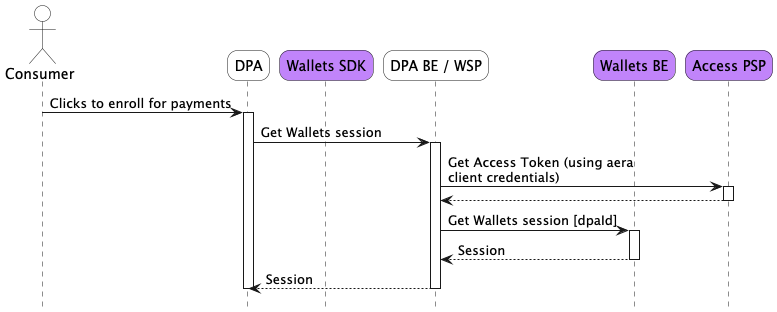
Getting Access Token and creating a wallet session
Create payment instrument session
This session can be utilized in the same manner as Create Wallet Session. The only difference is that the wallet dashboard will automatically initiate onboarding of the participating payment system provided in the Create payment instrument session once the SDK is authenticated and the sdk method for openUrl is called.
Get Session Details
As the WSP, you might have the need to extract some consumer information (like the sub). You can do this by using the Get wallet session details endpoint.
When calling this endpoint, if the consumer has not successfully authenticated yet, the sub will be null in the API response.
Updated 6 months ago
What’s Next
Look at the Aera Wallets SDK documentation to see how to open it, using the session created here.