
API version log
Features and changes in the Wallets API
2026.08.00
Released: 25.08.2026
🆕 New features
merchantReferencenow being sent to the WSP on Process WLW transaction result request.- Add support for query parameters in XTRA/CG-SDD redirect deeplink URL.
- Free sorting of all payment methods. No longer restrictions based on WSP settings.
- New Response codes:
- 68619 -> Transaction expired
- No further action is allowed to happen for this transaction. The use case for this new response code is if a transaction hasn't been either cancelled nor signed by the consumer within the Aera-defined timeout value of WLW transactions. Then the ECR will receive this in the Merchant callback or when performing Get Wallet Payment status as the
externalResponseCode.
- No further action is allowed to happen for this transaction. The use case for this new response code is if a transaction hasn't been either cancelled nor signed by the consumer within the Aera-defined timeout value of WLW transactions. Then the ECR will receive this in the Merchant callback or when performing Get Wallet Payment status as the
- 68619 -> Transaction expired
⚠️ Changes/important information
- Previously, we stated that we were going to remove the fields
statusfrom Get transaction status ,brandandschemeintransactionDetailsfrom Merchant callback and Get transaction status in release 2026.06.00. This will not happen until 2027, and the fields will stay as deprecated fields until then. More information about the exact release when it will be removed will be communicated during last quarter of 2026.
🐛 Bugfix
- More robust integration towards PSP for handling transactions.
- Improved duplicate validation for XTRA/CG-SDD payment methods (using `accountHolderId`).
-
As always; if duplicates are detected, no new payment method will be created, but all the information coming from the issuer will be updated (e.g. IBAN, bank name etc) on the existing payment method.
-
- More robust WspTransactionHistory implementation.
2026.06.01
Released: 30.06.2025
🆕 New Features
- Temporary - Bancontact onboarding endpoint —
POST /temp/wsp/wallets/{sub}/bancontactfor WSP-initiated Bancontact onboarding without full validation (will be removed in a future release). - Now supported to use
BANCONTACTas Participating payment system in Create payment instrument session. Up until now it was only there for documentation.
⚠️ Changes
schemefield deprecated —paymentMethodreplaces brand/scheme intransactionDetails(old field retained for backward compatibility until next release). This change effects these endpoints:-
Payment Instrument type
The Participating payment system XTRA, will remain as
PaymentInstrumentType = CARD. It was previously stated under Payment methods that this would change.
🐛 Bug Fixes
- Now displaying previously hidden parameter
redirectUriin Create payment instrument session. This URL will be used to redirect the consumer back to a specific app/webpage after a payment instrument onboarding is complete. - Add missing field
merchantReferenceto WSP Transaction lookup response objects.
2026.06.00
Released: 12.06.2025
- WSP Transaction lookup
- Transaction lookup information page.
- Two new endpoints: Get wallet transaction and Get wallet transaction history.
2026.05.01
Released: 28.05.2025
- New wallet Response codes
- Session expired: 68514
- Transaction in process: 68616 (mainly to give more information due to
statusfield being removed from Wallet transaction status) - Transaction authorized: 68617 (mainly to give more information due to
statusfield being removed from Wallet transaction status) - Transaction captured: 68618 (mainly to give more information due to
statusfield being removed from Wallet transaction status) - Unauthorized: 40004 (generic error for invalid credentials)
- Added
BANCONTACTtoparticipatingPaymentSystemenum in Create payment instrument session. Note: This is only for documentation and will not work until a new release is made stating otherwise.
2026.05.00
Released: 13.05.2025
- ⚠️ CHANGE: The Merchant callback has new values in case of failed full hybrid payment. Keep in mind there is no new fields, just new values on existing fields:
amountDetailsandtransactionDetails[].responseCode. Changes are reflected in the Hybrid Payment Ruleset. - 🐛 BUGFIX: Improved stability of cancellation of any potential authorized funds in case of failed full hybrid payment.
2026.04.01
Released: 30.04.2025
- 📔 DOCUMENTATION: New Response code and added some missing descriptions/examples added.
68513= Invalid CVD signature.
- ⚙️ FEATURE: New full hybrid payment flow, where full amount no longer has to be covered in full by a firm funding source.
- ⚙️ FEATURE: Added support for multiple firm funding sources in the same transaction (in preparations for Bancontact).
- 🐛 BUGFIX: Onboarding the same payment instrument multiple times to the same wallet (which should only result in override of existing information about that payment instrument) caused a broken state for the payment instrument priority. This could be seen as a "Duplicate key error" and cause errors during opening the wallet dashboard, as well as during transactions.
- 🐛 BUGFIX: Now sending
currencyon all sub-transactions/payment instruments listed intransactionDetailsin Merchant callback. - 🐛 BUGFIX: Not sending payment instruments with status
AUTHORIZATION_PENDINGIn merchant callback. Neither when transactions fail, nor when success. All payment instruments should have reached a "final state" before sending callback to merchant/ECR. - 🐛 BUGFIX: For full hybrid payment, now showing correct
amounton firm funding source intransactionDetailswhen amount is reallocated from voucher to firm funding source. - 🔒SECURITY: Internal security patches.
2026.04.00
Released: 22.04.2025
- New Response codes
- Extend PSP -> WLW apis to support new/updated fields (
amountDetailsandtransactionDetails) for the following functionality:- Get transaction status (ECR -> PSP)
- Merchant callback (PSP -> ECR)
-
Temporary reduced wait time before WSP events are sent (60s -> 10s). Will be adjusted back later this year.
- Bugfix:
- Empty string for
redirect_urifrom DPA will cause a bad request exception (HTTP status 400) and in turn a controlled error from the Wallets SDK. - Sending Merchant callback even in error scenarios.
- Empty string for
Internal changes (not effecting WSP)
- Internal security patches.
- Implemented stability for API calls to internal Aera services and balance checks.
2026.03.01
Released: 31.03.2025
New features
- New Wallet Management API endpoint for creating session that can be used for initiating onboarding of a payment instrument: Create payment instrument session.
- This endpoint introduces a new "concept":
paymentInstrumentType. Read more about "Participating Payment System VS Payment Instrument Type" here. - This endpoint also introduces a new WLW Response code
68708.
- This endpoint introduces a new "concept":
- DPA can now configure a set of allowed redirect URLs.
-
Note: This list of URLs has to be communicated to Aera, and Aera will then add them to the DPA configuration in our systems.
-
- Add support for XTRA acquiring using the Aera PSP.
2026.03.00
Released: 20.03.2025
WSP API changes
- Added new field (
proprietaryData) will be received by the WLW, from the ECR/PSP and passed on the WSP in the Process WLW transaction init request and Process WLW transaction result request requests.
Functional changes to the WLW
- WLW is now integrated to the real Aera PSP.
- If a consumer tries to add the same payment instrument twice to the same wallet, WLW will no longer return an error. It will accept the new information and overwrite the existing payment instrument.
A re-onbarding for all wallets is needed.
2026.02.00
Released: 23.02.2025
This release contains no changes to the WLW API specifications.
Aera PSP API docs
We have updated the Aera PSP API documentation.
Other Updates
- General security patches
- Now sending dateOfBirth to XTRA issuing API during onboarding of XTRA payment instruments.
2026.01.00
Bugfixes
- Made sure to always populate the field
sessionExpirationTimewhen WLW is calling the WSP endpoint: Process WLW transaction init request
2025.12.00
Released: 19.12.2025
New WSP wallet management endpoints
Updated response body for Get Wallet details
The following fields (in the root object) is now controlled by the WSP:
emailloyaltyIdphoneNumber
This means that Aera will not populate these fields, unless provided by the WSP using the Update Wallet details endpoint.
In the response body we have added a new field called userInfo, this field contains personal information, which Aera acquires during a wallet onboarding. The content of this field can't be updated by the WSP, only by the consumer when performing an onboarding.
This means that, for example the
userInfomay not be the same as the
New query parameters for Get Wallet details
includeSDKInfo= When set totruethis will populate the listsdkIdswith the id of all the SDKs associated with this wallet.includeUserInfo= When set totruethis will populate theuserInfofield.-
For
userInfoto be available, consumers have to perform a new onboarding (you do not need to delete the whole wallet).
-
Other small improvements
- No longer require the field
identityTrustAnchoron Create Xtra Payment Instrument.-
A default value is hard coded until we receive information from Xtra regarding what can be a valid value.
-
- Sending WSP events when onboarding an XTRA payment instrument.
- Expanded the
datafield within the WSP events for payment instrument onboarding to include:maskedPannickname
- Now sending WSP events both when a consumer or WSP delete a single payment instrument from a wallet.
2025.11.00
Released: 5.12.2025
New page for response codes
Updated demo PSP headers
Added the following headers, to make the demo PSP even more similar to the actual PSP:
idempotency-key
The DemoPSP must be treated as what it is; a demo application. Changes in the API specification may still be needed to successfully integrate towards the real Aera PSP.
New request body examples for transactions
Updated request/response examples in API Reference for each endpoint
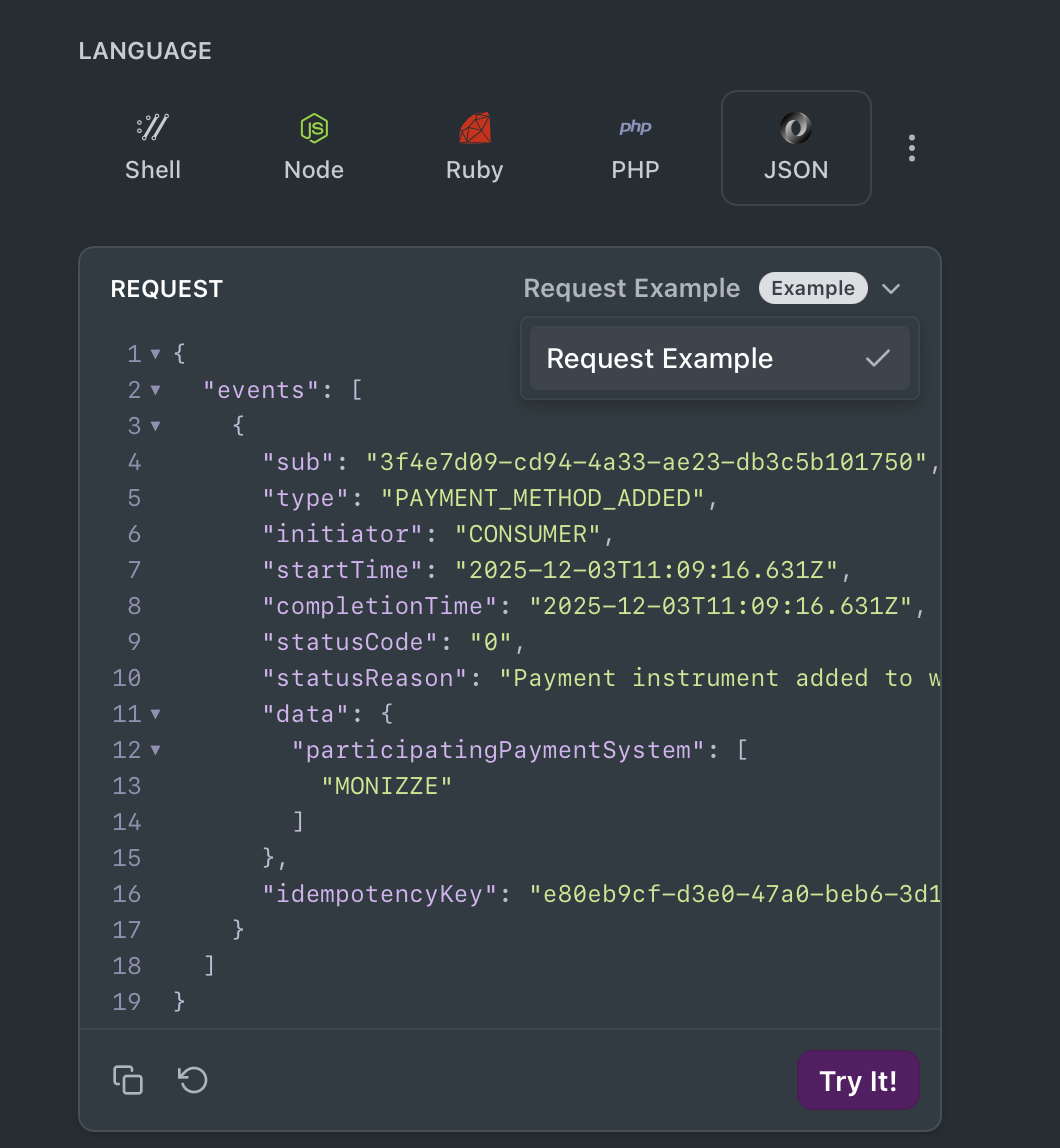
WSP Events example
Duplicate validation
- Consumers will no longer be able to onboard the same MONIZZE account (duplicates) multiple times to the same wallet. The same MONIZZE account can still be onboard to multiple wallets.
- Note: duplicate validation does only work for MONIZZE accounts added to a wallet after this release. It is suggested to re-onboard any existing MONIZZE accounts.
- Duplicate XTRA accounts, with the same IBAN can't be onboard to the same wallet. The same XTRA account can still be onboard to multiple wallets.
New Session details endpoint
See Wallet Session Management for more details. You can find the API specifications here.
2025.10.01
Released: 31.10.2025
WSP Management API
- New endpoint for onboarding XTRA payment instruments
New transaction status
SIGNED= Consumer has signed transaction and it is no longer possible to cancel the transaction.
Explicitly clarifying expectations related to normal handling of Aera Wallet API.
2025.10.00
Released: 31.10.2025
WLW ➡️ WSP integration changes
- Changed field(s) in Process WLW transaction init request
sessionIdwithin thesessionobject was always equal to the fieldtransactionId. To be consistent, we have removed the fieldtransactionId, meaning you should rely onsessionIdwithin thesessionobject.- Removed
statusfield.
- Change field Process WLW transaction result request.
transactionId➡️sessionId
- Change field in Process WLW events:
- In the
datafield you have been able to expect atransactionIdwhen receiving transaction events, this field has now changed tosessionId. See example event in WSP Events table.
- In the
ECR ➡️ PSP integration changes
- New endpoints that will replace old endpoints:
2025.09.00
Released: 30.09.2025
DYNAMIC_SDKID
DYNAMIC_SDKIDNow support use of DYNAMIC_SDKID when initiating transactions towards Aera demo PSP.
2025.08.00
Released: 29.08.2025
-
WSP Events have been implemented. See page WSP Events for examples, as well as what type of events you can expect at this time.
-
New endpoint for deleting single wallet sdk.
-
New endpoint in demo PSP for canceling a transaction.
-
New field sent to transaction-init and transaction-result requests:
status= transactions status. See page "Transactions" for details about each possible status.
Updated about 1 month ago